Why Can't I See Overhead Expenses?
Overhead Expenses is a page on the web app for company costs that aren't for a project. If you can't find it, it's usually because of your role or your QuickBooks connection.
Where to find it
Overhead Expenses is under Expenses in the left menu. Clicking Expenses opens Project Expenses. To get to Overhead Expenses, hover over Expenses and click Overhead Expenses.
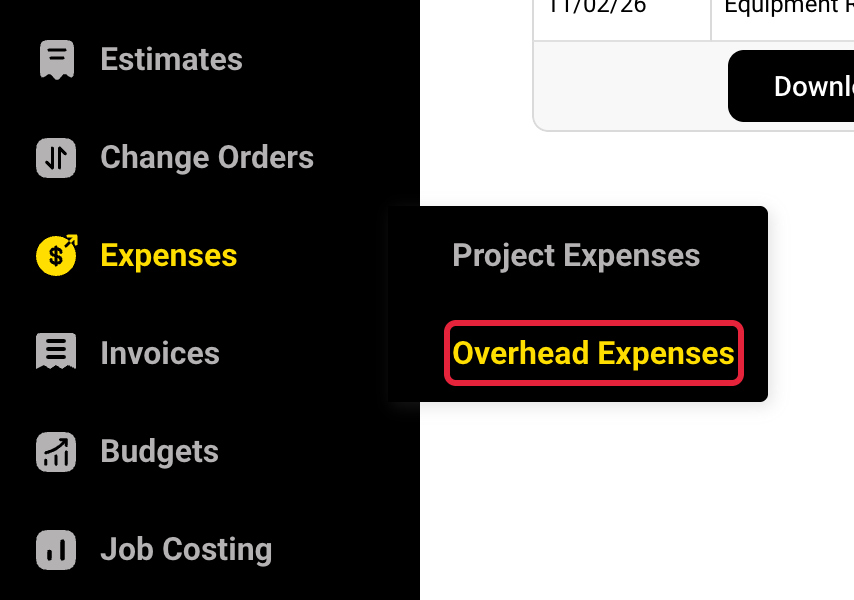
This works in Safari, Chrome and other browsers.
If you don't see it
Check these two things:
| Check | What to know |
|---|---|
| Your role | Only Owners and Administrators see Overhead Expenses. Managers and Members don't. |
| QuickBooks | Overhead Expenses only shows while your company is connected to QuickBooks. If QuickBooks is disconnected, the page sends you back to Project Expenses. |
If the menu still looks wrong after that, clear your browser cache. See How Do I Clear My Cache (Safari)?.
To learn how to use the page, see Add and Manage Overhead Expenses.
💬 Have a question? Click the round message button in the bottom-right corner of this page, then click Send a message. We usually reply within a few hours.